Lynx Touch - Door Window Sensor Batteries
Replace the battery in a door or window sensor. Your sensor uses either a CR123A lithium battery or a CR2032 battery. Find yours below.
Before You Start
- A new CR123A lithium battery or CR2032 battery, depending on your sensor
Sensor With an End Tab (CR123A Battery)
Press the tab on the end of the sensor to open the cover.
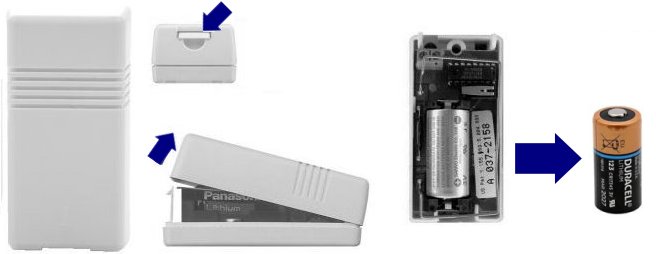
Press the end tab, then swap the CR123A battery Remove the old battery and put in a new CR123A lithium battery.
Sensor With a Sliding Cover (CR2032 Battery)
Slide the cover off.

Slide the cover off, then swap the CR2032 battery Pry the old CR2032 battery out of its holder.
Put in the new battery with the + side facing up.

Still Need Help?
Our support team can help with your Lynx Touch.
Contact Brinks Home™ Support